您现在的位置是:首页 > cms教程 > 帝国CMS教程帝国CMS教程
帝国cms列表页(list.var)判断推荐头条置顶并附加图标的方法
 君菁2023-01-22帝国CMS教程已有人查阅
导读首先注意开启置顶:后台 》 系统 》 系统参数设置 》 信息设置 》 信息置顶设置 ,选择 栏目/标签置顶
1、首先注意开启置顶:后台 》 系统 》 系统参数设置 》 信息设置 》 信息置顶设置 ,选择 栏目/标签置顶
2、使用的代码
①、调用几级推荐、头条、置顶 ,如下调用的都是一级的推荐、头条、置顶
if(!empty($bqr[titlepic])) //图片
if($bqr[isgood]==1) //推荐
if($r[firsttitle]==1) //头条
if($r[istop]==1) //置顶
if($bqr[isgood]==1&&$bqr[firsttitle]==1&&$bqr[istop]==1) //置顶-头条-推荐 (组合使用)
②、调用全部的推荐、头条、置顶(即:把“==1”修改为“>0”)
if(!empty($bqr[titlepic])) //图片
if($bqr[isgood]>0) //推荐
if($r[firsttitle]>0) //头条
if($r[istop]>0) //置顶
if($bqr[isgood]>0&&$bqr[firsttitle]>0&&$bqr[istop]>0) //置顶-头条-推荐 (组合使用)
方法1、判断各自的(有两个或两个以上的属性,也只显示一个属性),即:只显示一个图
注释:如一个信息有“推荐”和“头条”两个属性,下面的代码也只能让其显示一个属性(那个属性在前就先显示那个)
<?=$newimg?>可以是图片 $newimg="<img src='dg2/e/data/images/saypl.gif' />";
举例:
$r[title]=esub($r[title],27,'...');
$newimg="";
if($r[istop]==1)
{
$newimg="<font color=red>[顶]</font>";
}
elseif($r[isgood]==1)
{
$newimg="<font color=red>[荐]</font>";
}
elseif($r[firsttitle]==1)
{
$newimg="<font color=red>[头]</font>";
}
$listtemp='
<li>【'.$class_r[$r[classid]]['classname'].' 】【[!--this.classname--]】'.$newimg.' <a href="[!--titleurl--]" title="[!--oldtitle--]">[!--title--]</a> <span>[!--newstime--]</span></li>
';
注释:$newimg=""; newimg为空if($r[istop]==1){$newimg="<font color=red>[顶]</font>"; 当istop=1时,newimg显示“[顶]”
php部分还可以这样写判断 格式:if -> elseif -> else 意思:“判断” 或 “2判读” 否则 “为空”
实际上就是把$newimg=""; 用else放到了最下面
实例:
$r[title]=esub($r[title],27,'...');
if($r[istop]==1)
{
$newimg="<font color=red>[顶]</font>";
}
elseif($r[isgood]==1)
{
$newimg="<font color=red>[荐]</font>";
}
elseif($r[firsttitle]==1)
{
$newimg="<font color=red>[头]</font>";
}
else
{
$newimg="";
}
$listtemp='
<li>【'.$class_r[$r[classid]]['classname'].' 】【[!--this.classname--]】'.$newimg.' <a href="[!--titleurl--]" title="[!--oldtitle--]">[!--title--]</a> <span>[!--newstime--]</span></li>
';
方法2、判断各自的(有两个或两个以上的属性,可显示多个属性),即:可显示多个图。在上面代码的基础上组合了个“两个的属性”,即:一个信息两张图注释:如一个信息有“推荐”和“头条”两个属性,在上面的代码基础上加了一个判断的语句把“推荐”和“头条”组合在一起可以显示双属性的属性语句。
即:一条信息同时显示“推荐”和“头条”两个属性
<?=$newimg?>可以是图片 $newimg="<img src='dg2/e/data/images/saypl.gif' />";
举例:
$r[title]=esub($r[title],27,'...');
$newimg="";
if($r[isgood]==1&&$r[firsttitle]==1)
{
$newimg="<font color=red>[推荐]</font> <font color=red>[头条]</font>";
}
elseif($r[isgood]==1)
{
$newimg="<font color=red>[推荐]</font>";
}
elseif($r[firsttitle]==1)
{
$newimg="<font color=red>[头条]</font>";
}
$listtemp='
<li>【'.$class_r[$r[classid]]['classname'].' 】【[!--this.classname--]】'.$newimg.' <a href="[!--titleurl--]" title="[!--oldtitle--]">[!--title--]</a> <span>[!--newstime--]</span></li>
';
注释:$newimg=""; newimg为空if($r[istop]==1){$newimg="<font color=red>[顶]</font>"; 当istop=1时,newimg显示“[顶]”
php部分还可以这样写判断 格式:if -> elseif -> else 意思:“判断” 或 “2判读” 否则 “为空”
实际上就是把$newimg=""; 用else放到了最下面
实例:同上
方法3、判断各自的,(有两个或两个以上的属性,可显示多个属性),即:可显示多个图。各自加各自的图,即:每个属性上多能加多张图
<?=$newimg?>可以是图片 $newimg="<img src='dg2/e/data/images/saypl.gif' />";
$r[title]=esub($r[title],27,'...');
$newimg="";
$top="";
$good="";
$ttitle="";
if(!empty($r[titlepic]))
{
$newimg="<font color=red>[图片]</font>";
}
if($r[istop]==1)
{
$top = "<font color=red>[置顶]</font>";
}
if($r[isgood]==1)
{
$good = "<font color=red>[推荐]</font>";
}
if($r[firsttitle]==1)
{
$ttitle = "<font color=red>[头条]</font>";
}
$listtemp='
<li>【'.$class_r[$r[classid]]['classname'].' 】【[!--this.classname--]】 '.$newimg.' '.$top.' '.$good.' '.$ttitle.' <a href="[!--titleurl--]" title="[!--oldtitle--]">[!--title--]</a> <span>[!--newstime--]</span></li>
';
注释:$newimg="";、$top="";、$good="";、$ttitle=""; 各自为空[titlepic]、[istop]==1、[isgood]==1、[firsttitle]==1 当=1时,各自显示各自的图
php部分还可以这样写判断 格式:if -> else 意思:“判断” 否则 “为空”
实际上就是把$newimg=""; 用else放到了最下面
实例:
$r[title]=esub($r[title],27,'...');
if(!empty($r[titlepic]))
{
$newimg="<font color=red>[图片]</font>";
}
else
{
$newimg='';
}
if($r[istop]==1)
{
$top = "<font color=red>[置顶]</font>";
}
else
{
$top='';
}
if($r[isgood]==1)
{
$good = "<font color=red>[推荐]</font>";
}
else
{
$good='';
}
if($r[firsttitle]==1)
{
$ttitle = "<font color=red>[头条]</font>";
}
else
{
$ttitle='';
}
$listtemp='
<li>【'.$class_r[$r[classid]]['classname'].' 】【[!--this.classname--]】 '.$newimg.' '.$top.' '.$good.' '.$ttitle.' <a href="[!--titleurl--]" title="[!--oldtitle--]">[!--title--]</a> <span>[!--newstime--]</span></li>
';
图片、置顶、一级二级推荐、一级二级头条php部分还可以这样写判断 格式:if -> elseif -> else 意思:“判断” 或 “2判读” 否则 “为空”
实际上就是把$newimg=""; 用else放到了最下面
<br>------------------方法1----------------------<br>
$r[title]=esub($r[title],27,'...');
$newimg="";
$top="";
$good="";
$ttitle="";
if(!empty($r[titlepic]))
{
$newimg="<font color=red>[图片]</font>";
}
if($r[istop]==1)
{
$top = "<font color=red>[置顶]</font>";
}
if($r[isgood]==1)
{
$good = "<font color=red>[推荐]</font>";
}
elseif($r[isgood]==2)
{
$good="<font color=red>[推荐2]</font>";
}
if($r[firsttitle]==1)
{
$ttitle = "<font color=red>[头条]</font>";
}
elseif($r[firsttitle]==2)
{
$ttitle="<font color=red>[头条2]</font>";
}
$listtemp='
<li>【'.$class_r[$r[classid]]['classname'].' 】【[!--this.classname--]】 '.$newimg.' '.$top.' '.$good.' '.$ttitle.' <a href="[!--titleurl--]" title="[!--oldtitle--]">[!--title--]</a> <span>[!--newstime--]</span></li>
';
方法1:PHP部分的格式:为空 -> if -> elseif
<br>------------------方法2----------------------<br>
$r[title]=esub($r[title],27,'...');
if(!empty($r[titlepic]))
{
$newimg="<font color=red>[图片]</font>";
}
else
{
$newimg='';
}
if($r[istop]==1)
{
$top = "<font color=red>[置顶]</font>";
}
else
{
$top='';
}
if($r[isgood]==1)
{
$good = "<font color=red>[推荐]</font>";
}
elseif($r[isgood]==2)
{
$good="<font color=red>[推荐2]</font>";
}
else
{
$good='';
}
if($r[firsttitle]==1)
{
$ttitle = "<font color=red>[头条]</font>";
}
elseif($r[firsttitle]==2)
{
$ttitle="<font color=red>[头条2]</font>";
}
else
{
$ttitle='';
}
$listtemp='
<li>【'.$class_r[$r[classid]]['classname'].' 】【[!--this.classname--]】 '.$newimg.' '.$top.' '.$good.' '.$ttitle.' <a href="[!--titleurl--]" title="[!--oldtitle--]">[!--title--]</a> <span>[!--newstime--]</span></li>
';
方法2:PHP部分的格式:if -> elseif -> else
感谢您的认可和支持

微信

支付宝
本文标签:
很赞哦! ()
相关教程
图文教程
帝国cms模板利用php实现无限级导航指定ID的方法
指定显示一级栏目下的子栏目(不显示父栏目)如果把daohang($bclassid=0)和下面的 daohang(0);改成对应父栏目ID就循环显示该栏目下的子栏目了
帝国二次开发会员注册怎么加入问答验证
修改文件有e/enews/index.php,/e/member/register/register.php.加入了
帝国CMS调用SQL所有软件总下载数和浏览次数的方法
软件总下载数:<?=$empire->gettotal("select sum(totaldown) as total from phome_ecms_download")?>文章总浏览数: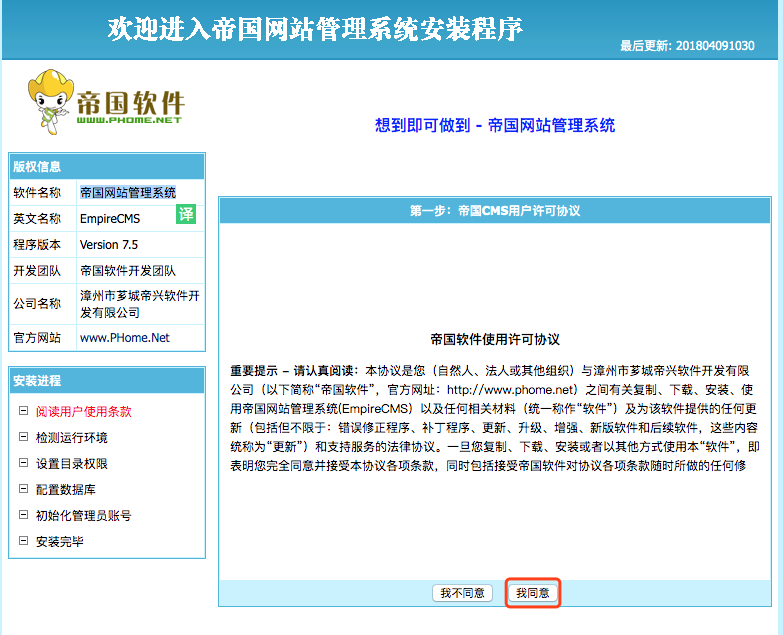
帝国7.5安装教程(帝国cms7.5怎么安装)
然后需要配置环境,帝国CMS支持PHP和MySQL数据库”或服务器已经成功安装“PHP和MySQL数据库”。正常登录后台,安装完成。
相关源码
-
 帝国cms7.5品牌连锁店招商加盟商机网站模版源码本模板为招商加盟、创业投资、品牌连锁等商业领域设计,采用帝国CMS7.5内核构建,整体风格简洁大气,突出商业信任感与专业度,适合各类招商加盟项目展示、品牌连锁店宣传等商业应用场景。查看源码
 -
 响应式帝国cms7.5NBA黑色体育资讯模板下载本模板为体育新闻媒体、报道机构设计,采用帝国CMS7.5内核开发,具备完整的资讯发布、体育日历、数据展示功能。响应式布局确保在手机端呈现实时资讯和图文内容查看源码
 -
 响应式电脑维修办公用品维护pbootcms网站模板模板介绍(自适应手机版)响应式电脑修理公司pbootcms网站模板-蓝色HTML5电脑修理维修店网站源码下载PbootCMS内核开发的营销型网站模板,该模查看源码
 -
 (自适应响应式)html5蓝色智能水表营销型网站pbootcms模板下载PbootCMS内核开发,为智能水表企业打造的营销型网站解决方案,本模板基于PbootCMS内核开发,为智能水表及相关行业企业设计,采用HTML5+CSS3技术构建,具有响应式布局。查看源码
 -
 (自适应响应式)APP应用程序软件介绍落地页源码免费下载该模板为营销技术从业者设计,提供专业的内容展示平台。采用响应式布局,适配软件介绍、APP推广等营销场景,通过可视化后台可快速搭建符合行业特性的展示网站。查看源码
 -
 (PC+WAP)绿色产品环保设备垃圾桶厂家公司网站pbootcms模板为垃圾桶生产商、环保设备企业打造的高端响应式门户模板,基于PbootCMS开源内核深度开发。采用HTML5自适应架构,无缝实现PC与手机端数据实时同步与交互优化查看源码
| 分享笔记 (共有 篇笔记) |