您现在的位置是:首页 > cms教程 > 帝国CMS教程帝国CMS教程
帝国cms编辑器ckeditor安装代码高亮插件
 原创2025-09-18帝国CMS教程已有人查阅
导读帝国cms内容文本编辑器多数为ckeditor,官网也提供了很多的扩展功能和插件,但是帝国并没有相关编辑器高亮代码插件,高亮代码就是通过Code Snippet插件来实现高亮代码的功能。我
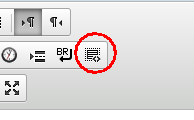
至于前端显示的风格可以查看这篇文章>>帝国cms高亮代码添加行号前端显示Mac OS风格
安装后的效果
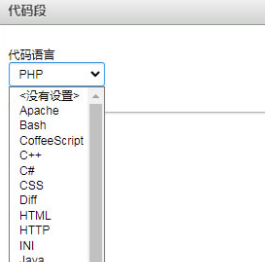
实现步骤
下面是修改的步骤
步骤一:下载codesnippet文件和相关依赖工具
Code Snippet下载地址: https://ckeditor.com/cke4/addon/codesnippet
Widget下载地址: https://ckeditor.com/cke4/addon/widget
Line下载地址: Utilities https://ckeditor.com/cke4/addon/lineutils
将3个文件解压后上传到e/admin/ecmseditor/infoeditor/plugins/
(注意:本人在使用最新版本时并不能实现相关功能,可能是版本不兼容,亦或者是博主技术不到家,如果只是实现相关功能的可以下载博主提供的文件或者下载较老的版本)
步骤二:修改ckeditor配置config.js
修改帝国cms7.5编辑器配置文件e/admin/ecmseditor/infoeditor/config.js
1、增加扩展配置,extraPlugins = 'codesnippet';
大概120行
config.extraPlugins = 'etranfile,etranmedia,etranmore,autoformat,ecleanalltext,einsertbr,einsertpage,einserttime,equotetext';
修改为
config.extraPlugins = 'etranfile,etranmedia,etranmore,autoformat,ecleanalltext,einsertbr,einsertpage,einserttime,equotetext,codesnippet';
2、工具栏添加 CodeSnippet 功能大概在95行'einsertbr'后添加,'CodeSnippet'注意大小写,c和s要大写
{ name: 'insert', items: [ 'Image', 'etranmore', 'Flash', 'etranmedia', 'etranfile', '-', 'Table', 'HorizontalRule', 'SpecialChar', 'equotetext', 'einserttime', 'einsertpage', 'einsertbr','CodeSnippet' ] },
3、设置代码高亮样式在文件末尾添加以下代码
config.codeSnippet_theme= 'monokai_sublime'; //monokai_sublime为高亮css样式文件名
为方便,可直接将下面代码覆盖你的config.js代码
function EcmsEditorDoCKhtml(htmlstr){
	if(htmlstr.indexOf('"')!=-1)
	{
		return '';
	}
	if(htmlstr.indexOf("'")!=-1)
	{
		return '';
	}
	if(htmlstr.indexOf("/")!=-1)
	{
		return '';
	}
	if(htmlstr.indexOf("\\")!=-1)
	{
		return '';
	}
	if(htmlstr.indexOf("[")!=-1)
	{
		return '';
	}
	if(htmlstr.indexOf("]")!=-1)
	{
		return '';
	}
	if(htmlstr.indexOf(":")!=-1)
	{
		return '';
	}
	if(htmlstr.indexOf("%")!=-1)
	{
		return '';
	}
	if(htmlstr.indexOf("<")!=-1)
	{
		return '';
	}
	if(htmlstr.indexOf(">")!=-1)
	{
		return '';
	}
	return htmlstr;
}
function EcmsEditorGetCs(){
	var js=document.getElementsByTagName("script");
	for(var i=0;i<js.length;i++)
	{
		if(js[i].src.indexOf("ckeditor.js")>=0)
		{
			var arraytemp=new Array();
			arraytemp=js[i].src.split('?');
			return arraytemp;
		}
	}
}

var arraycs=new Array();
arraycs=EcmsEditorGetCs();

arraycs[0]=arraycs[0].replace('infoeditor/ckeditor.js','');


CKEDITOR.editorConfig = function( config ) {
	// Define changes to default configuration here. For example:
	// config.language = 'fr';
	// config.uiColor = '#AADC6E';

	config.filebrowserImageUploadUrl = '';
	config.filebrowserFlashUploadUrl = arraycs[0];
	config.filebrowserImageBrowseUrl = arraycs[1];
	config.filebrowserFlashBrowseUrl = arraycs[1];

	config.enterMode = CKEDITOR.ENTER_BR;
	config.shiftEnterMode = CKEDITOR.ENTER_P;

	config.allowedContent= true;

	config.font_names='宋体/宋体;黑体/黑体;仿宋/仿宋_GB2312;楷体/楷体_GB2312;隶书/隶书;幼圆/幼圆;微软雅黑/微软雅黑;'+ config.font_names;

	// Toolbar
	config.toolbar_full = [
	{ name: 'document', groups: [ 'mode', 'document', 'doctools' ], items: [ 'Source', '-', 'Preview', 'Print' ] },
	{ name: 'clipboard', groups: [ 'clipboard', 'undo' ], items: [ 'Cut', 'Copy', 'Paste', 'PasteText', 'PasteFromWord', '-', 'Undo', 'Redo' ] },

	{ name: 'paragraph', groups: [ 'list', 'indent', 'blocks', 'align', 'bidi' ], items: [ 'NumberedList', 'BulletedList', '-', 'Outdent', 'Indent', '-', 'Blockquote', 'CreateDiv', '-', 'JustifyLeft', 'JustifyCenter', 'JustifyRight', 'JustifyBlock', '-', 'BidiLtr', 'BidiRtl' ] },
	'/',
	{ name: 'basicstyles', groups: [ 'basicstyles', 'cleanup' ], items: [ 'Bold', 'Italic', 'Underline', 'Strike', 'Subscript', 'Superscript', '-', 'RemoveFormat', 'ecleanalltext', 'autoformat' ] },

	{ name: 'links', items: [ 'Link', 'Unlink', 'Anchor' ] },
	{ name: 'insert', items: [ 'Image', 'etranmore', 'Flash', 'etranmedia', 'etranfile', '-', 'Table', 'HorizontalRule', 'SpecialChar', 'equotetext', 'einserttime', 'einsertpage', 'einsertbr','CodeSnippet' ] },
	'/',
	{ name: 'styles', items: [ 'Styles', 'Format', 'Font', 'FontSize' ] },
	{ name: 'colors', items: [ 'TextColor', 'BGColor' ] },
	{ name: 'tools', items: [ 'ShowBlocks', 'NewPage', 'Templates' ] },
	{ name: 'others', items: [ '-' ] },
	{ name: 'editing', groups: [ 'find', 'selection', 'spellchecker' ], items: [ 'Find', 'Replace', '-', 'SelectAll', 'Maximize' ] }
];


	// Toolbar
	config.toolbar_basic = [
	{ name: 'document', groups: [ 'mode', 'document', 'doctools' ], items: [ 'Source' ] },
	{ name: 'clipboard', groups: [ 'clipboard', 'undo' ], items: [ 'Cut', 'Copy', 'Paste', 'PasteText', 'PasteFromWord', '-', 'Undo', 'Redo' ] },
	{ name: 'links', items: [ 'Link', 'Unlink', 'Anchor' ] },
	{ name: 'insert', items: [ 'Image', 'Table', 'HorizontalRule', 'SpecialChar' ] },
	{ name: 'tools', items: [ 'Maximize' ] },
	{ name: 'others', items: [ '-' ] },
	'/',
	{ name: 'basicstyles', groups: [ 'basicstyles', 'cleanup' ], items: [ 'Bold', 'Italic', 'Strike', '-', 'RemoveFormat' ] },
	{ name: 'paragraph', groups: [ 'list', 'indent', 'blocks', 'align', 'bidi' ], items: [ 'NumberedList', 'BulletedList', '-', 'Outdent', 'Indent', '-', 'Blockquote' ] },
	{ name: 'styles', items: [ 'Styles', 'Format' ] }
];


	config.extraPlugins = 'etranfile,etranmedia,etranmore,autoformat,ecleanalltext,einsertbr,einsertpage,einserttime,equotetext,codesnippet';


	config.toolbar = 'full';


	config.codeSnippet_theme= 'monokai_sublime'; //monokai_sublime为高亮css样式文件名
};
版本不同替换谨慎,可能需要自己按上面步骤修改。致此ckeditor添加代码高亮功能已经完成了,预览添加效果请清除浏览器缓存。
步骤三:内容页模板添加高亮代码样式
所有的样式都在目录里:e\admin\ecmseditor\infoeditor\plugins\codesnippet\lib\highlight\styles
选择一个自己喜欢的样式,添加到内容模板中,为了不暴露我们的后台登录地址可以把highlight文件复制到根目录的skin文件下
在内容页模板添加以下三行代码,即可高亮显示代码
<link rel="stylesheet" href="[!--news.url--]skin/highlight/styles/monokai_sublime.css">
<script src="[!--news.url--]skin/highlight/highlight.pack.js"></script>
<script>hljs.initHighlightingOnLoad();</script>
其他问题的修改1. 代码不能自适应页面大小,或超出部分不显示
修改办法:
在自己引用的css文件中添加以下样式,我引用的是monokai_sublime.css
在css文件中的.hljs{}内添加:
white-space: pre-wrap;
word-break: break-all;//超出部分自动换行
或改为
overflow-y: auto;//当代码超出显示区域将自带滚动条
高亮代码功能修改全部完成。
感谢您的认可和支持

微信

支付宝
本文标签:帝国cms功能开发
很赞哦! ()
相关教程
图文教程
帝国CMS循环子栏目及子栏目下面数据的方法
循环帝国CMS循环子栏目及子栏目下面的数据方法,看下面这段代码。e:loop调用bclassid等于1的父级栏目下面的数据
帝国cms多个搜索多个模板(不同栏目不同搜索模板)原创教程
今天下午有人问代码号搜索结果很乱,太多分不清是教程还是模板,能不能优化搜索教程结果就是教程,搜模板的结果就是模板,给不同的页面结果。答案是可以的。下面来具体操作思路分享
帝国CMS灵动标签怎么调用多表多模型调用文章的方法
灵动标签调用多表多模型调用文章,帝国CMS多表调用最新信息,该演示代码为默认数据表下全站最新10条图片信息,自己根据需求可以附加条件,实现全站点击,全站头条,全站推荐等等.
帝国cms上传大图片或附件的教程
帝国cms默认上传不了太大的图片或附件,需要修改后台设置,如果不行还需要修改php配置。方法一、修改后台上传附件大小
相关源码
-
 (自适应)电梯扶梯升降梯行业pbootcms企业网站模板(自适应手机版)响应式电梯扶梯类pbootcms模板 电梯生产企业绿色企业网站源码下载PbootCMS内核开发的网站模板,该模板适用于电梯、扶梯类等企业,查看源码
 -
 (自适应响应式)动力刀座五金机械设备pbootcms网站源码下载为动力刀座及五金机械企业定制的响应式网站框架,基于PbootCMS系统深度开发,助力传统制造企业实现数字化转型升级。采用手工编写的DIV+CSS前端架构,代码执行效率提升40%。查看源码
 -
 响应式艺考培训学校机构pbootcms模板html5源码基于PbootCMS免费开源内核开发,为艺考培训学校与艺术机构设计,替换图文即可快速适配全行业需求。响应式布局兼容手机/PC端,数据实时同步,运维效率提升300%。查看源码
 -
 (自适应)蓝色自动溶剂萃取仪器设备类网站pbootcms模板下载本模板为溶剂萃取设备、实验室仪器等精密仪器行业设计,采用PbootCMS内核开发,具有高度专业性和行业适配性。模板设计充分考虑了仪器设备行业展示需求,能够呈现各类精密仪器的技术参数、应用场景和解决方案。查看源码
 -
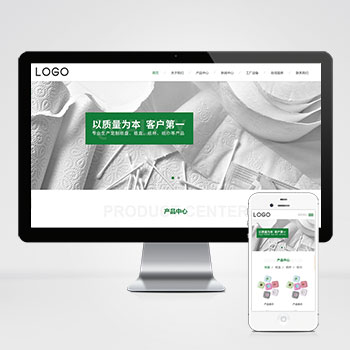 (自适应)居家生活日用品纸盘纸盒纸杯卫生纸巾生产厂家pbootcms模板为纸品生产企业打造的现代化展示平台,自动适应各种设备屏幕,确保浏览体验一致,完善的SEO功能,提升网站曝光度,基于PbootCMS构建,源码开放可定制。查看源码
 -
 (自适应响应式)高端简繁双语HTML5金融资本咨询单页pbootcms模板采用响应式设计确保在各类手机端设备很好的呈现。该模板专注于金融咨询、资本管理等领域企业形象展示,通过结构化布局突出行业专业度与可信度,后台数据同步管理简化内容维护流程。查看源码
| 分享笔记 (共有 篇笔记) |