您现在的位置是:首页 > cms教程 > 帝国CMS教程帝国CMS教程
帝国CMS分类信息发布信息选择多久之后显示过期图标
 昕汶2023-04-22帝国CMS教程已有人查阅
导读分类信息有效期设置,如图:第一步:增加字段gqtime类型选择日期。投稿表单替换html代码(增加字段时请留空)内容修改为:
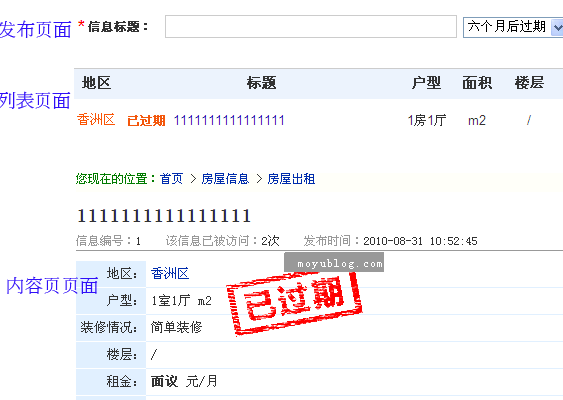
分类信息有效期设置,如图:第一步:增加字段
<select name="gqtime" id="gqtime"><option value="<?echo date("Y-m-d",strtotime("+7day")); ?><?=DoReqValue($tbname,'gqtime',stripSlashes($r[gqtime]))?>">7天后过期</option><option value="<?echo date("Y-m-d",strtotime("+1month")); ?><?=DoReqValue($tbname,'gqtime',stripSlashes($r[gqtime]))?>">一个月后过期</option><option value="<?echo date("Y-m-d",strtotime("+3month")); ?><?=DoReqValue($tbname,'gqtime',stripSlashes($r[gqtime]))?>">三个月后过期</option><option value="<?echo date("Y-m-d",strtotime("+6month")); ?><?=DoReqValue($tbname,'gqtime',stripSlashes($r[gqtime]))?>" selected>六个月后过期</option><option value="<?echo date("Y-m-d",strtotime("+20year")); ?><?=DoReqValue($tbname,'gqtime',stripSlashes($r[gqtime]))?>">长期有效</option></select>
第二步:打开e/class/connect.php文件,找到 //栏目链接。在其上面一行加入如下代码:
//时间
        $odate = round(((strtotime($r[gqtime])-strtotime(date('Y-m-d')))/86400),0);
         if ($odate>0)
                 {
                 $diffTime = ''; //
                 }
         else if ($odate==0)
                 {
                 $diffTime = '今天到期 ';
                 }
         else
                  {
                 $diffTime = '<span class="expire">已过期</span> ';
                 }
        $listtemp = str_replace ('[!--diffTime--]', $diffTime, $listtemp);
第三步:信息调用:
列表页调用:[!--diffTime--]
内容页引用JS:
<script language="javascript" src="images/date.js"></script>
在需要显示的地方调用:
<script>check_tdate('[!--gqtime--]')</script>
date.js 文件代码如下:
// JavaScript Document
function check_tdate(odate){
var checkArray= new Array() ;
//nowArray    = odate.split(" ");
checkArray    = odate.split("-");
checkDate   = new  Date(checkArray[0],checkArray[1],checkArray[2]);

var nowTime   = new Date();// 现在时间
var the_year  = nowTime.getYear();
var the_month = nowTime.getMonth() + 1;
var the_day   = nowTime.getDate();
nowTime    = new  Date(the_year,the_month,the_day);

var thesecond = 24 * 60 * 60 *1000 ;
var diffTime  = (nowTime - checkDate)/thesecond;//计算天数
if (diffTime>0)
{
myreturn ="<div style='position:absolute;z-index:100;margin-left:150px;'><img src=../../../images/guoqi.gif></div>";
}
else if (diffTime==0)
{
myreturn = '';
}
else
  {
diffTime=0-diffTime;
myreturn = '';
}
//alert(myreturn);
document.write(''+myreturn+'')
}
已过期图片:

感谢您的认可和支持

微信

支付宝
本文标签:
很赞哦! ()
相关教程
- (PC+手机)帝国cms7.5漫画图片连载网站源码免费下载
- 帝国CMS7.5二次元COS漫展网站模板源码免费下载
- 帝国CMS7.5小说推荐公众号导航带wap手机站+带采集工具
- 帝国CMS7.5漫画网站模板带手机端源码免费下载
- 帝国cms7.5游戏门户H5小游戏网站模板源码免费下载
- 帝国CMS游戏应用APP推广下载站模板免费下载
- 帝国CMS7.5H5小游戏模板游戏攻略下载网整站源码
- 帝国cms7.5手游评测资讯礼包合集游戏专区下载网站模板
- 帝国cms7.5大型游戏资讯门户网站源码免费下载
- 帝国CMS7.5手游资讯下载综合门户免费网站模板
- 帝国cms7.5奇闻异事末解之谜模板免费下载带数据
- 帝国cms7.5模板情感文学名言名句心情文章类源码下载带手机
图文教程

帝国cms列表页怎么获取父级栏目以及所有子栏目的方法
获取父级栏目以及所有子栏目的两种方法,推荐第二种!
帝国CMS首页模板或其他非内容模板调用新闻正文字段newstext的方法
因为正文字段存放在副表,所以灵动标签直接调用是不可以的,那么就需要变通的做法或者写法了,以下提供几种方法供小伙伴们参考:
帝国CMS自定义列表的排序newstime时间,onclick点击或浏览,plnum 评论,diggtop
[!db.pre!]ecms_movie 为数据表类型(movie是电影数据表)举一反三排序方式:id(id)、newstime (时间)、onclick(点击或浏览)、p统计记录: select count(*) as total from [!db.pre!]ecms_movie
帝国CMS灵动标签怎么在内容页调用列表页关键字
在内容页调用栏目页关键字,可是网上提供的标签都不能用。下面我给大家提供一下
相关源码
-
 (pc+wap)pbootcms网站模板蓝色小程序网站开发公司基于PbootCMS内核开发的营销型门户模板,为小程序开发公司、电商软件企业打造。采用HTML5自适应架构,实现PC与手机端数据实时同步展示查看源码
 -
 帝国cms题库问答学习平台模板知识付费网站源码+数据采集为教育机构、培训平台及在线学习场景设计,提供完整的题库管理与问答服务解决方案。支持多种题型展示与答案查询,满足不同层次的学习需求。查看源码
 -
 pbootcms模板(PC+WAP)APP应用软件下载类官网源码为APP应用软件官网打造的响应式解决方案,PC端与移动端(WAP)数据实时同步,一次更新全网生效,满足多终端用户无缝体验需求。查看源码
 -
 (自适应)刷卡pos机数据移动支付设备电子科技pbootcms模板下载本模板为POS机设备制造商、移动支付终端服务商和科技企业设计,基于PbootCMS系统开发,提供完整的在线展示平台解决方案,满足支付设备行业特有的展示需求。查看源码
 -
 (自适应响应式)动力刀座五金机械设备pbootcms网站源码下载为动力刀座及五金机械企业定制的响应式网站框架,基于PbootCMS系统深度开发,助力传统制造企业实现数字化转型升级。采用手工编写的DIV+CSS前端架构,代码执行效率提升40%。查看源码
 -
 帝国cms7.5模板生活常识美食女性时尚综合资讯门户源码本模板为帝国cms7.5生活资讯类网站设计,以天奇生活网为参考原型,涵盖生活常识、美食烹饪、女性时尚等多元化内容板块。采用响应式布局设计,适配各种终端设备,为访客提供优质的阅读体验。模板结构清晰合理,内容展示层次分明,符合生活类网站的用户需求。查看源码
| 分享笔记 (共有 篇笔记) |