您现在的位置是:首页 > cms教程 > 帝国CMS教程帝国CMS教程
帝国7.5默认编辑器增加代码高亮的方法
 凡梅2023-05-20帝国CMS教程已有人查阅
导读需要下载的插件及依赖工具,将下载的插件解压,并复制到帝国的ckeditor目录下,注意是后台的那个默认后台目录:eadminecmseditorinfoeditorplugins
https://ckeditor.com/cke4/addon/
需要下载的插件及依赖工具
1、Code Snippet
2、widget
3、lineutils
4、widgetselection
安装步骤
将下载的插件解压,并复制到帝国的ckeditor目录下,注意是后台的那个
默认后台目录:eadminecmseditorinfoeditorplugins
修改配置文件
配置文件路径:eadminecmseditorinfoeditORConfig.js
配置文件中共有两个工具条,一个是全功能的,一个是精简的
在两个工具条中添加代码工具CodeSnippet
然后在工具条下方添加代码工具的配置
这里我把我的发上来供大家参考
CKEDITOR.editorConfig = function( config ) {
// Define changes to default configuration here. For example:
// config.language = 'fr';
// config.uiColor = '#AADC6E';
config.filebrowserImageUploadUrl = '';
config.filebrowserFlashUploadUrl = arraycs[0];
config.filebrowserImageBrowseUrl = arraycs[1];
config.filebrowserFlashBrowseUrl = arraycs[1];
config.enterMode = CKEDITOR.ENTER_BR;
config.shiftEnterMode = CKEDITOR.ENTER_P;
config.allowedContent= true;
config.font_names='宋体/宋体;黑体/黑体;仿宋/仿宋_GB2312;楷体/楷体_GB2312;隶书/隶书;幼圆/幼圆;微软雅黑/微软雅黑;'+ config.font_names;
// Toolbar
config.toolbar_full = [
{ name: 'document', groups: [ 'mode', 'document', 'doctools' ], items: [ 'Source', '-', 'Preview', 'Print' ] },
{ name: 'clipboard', groups: [ 'clipboard', 'undo' ], items: [ 'Cut', 'Copy', 'Paste', 'PasteText', 'PasteFromWord', '-', 'Undo', 'Redo' ] },
{ name: 'paragraph', groups: [ 'list', 'indent', 'blocks', 'align', 'bidi' ], items: [ 'NumberedList', 'BulletedList', '-', 'Outdent', 'Indent', '-', 'Blockquote', 'CreateDiv', '-', 'JustifyLeft', 'JustifyCenter', 'JustifyRight', 'JustifyBlock', '-', 'BidiLtr', 'BidiRtl' ] },
'/',
{ name: 'basicstyles', groups: [ 'basicstyles', 'cleanup' ], items: [ 'Bold', 'Italic', 'Underline', 'Strike', 'Subscript', 'Superscript', '-', 'RemoveFormat', 'ecleanalltext', 'autoformat' ] },
{ name: 'links', items: [ 'Link', 'Unlink', 'Anchor' ] },
{ name: 'insert', items: [ 'Image', 'etranmore', 'Flash', 'etranmedia', 'etranfile', '-', 'Table', 'HorizontalRule', 'SpecialChar','CodeSnippet', 'equotetext', 'einserttime', 'einsertpage', 'einsertbr' ] },
'/',
{ name: 'styles', items: [ 'Styles', 'Format', 'Font', 'FontSize' ] },
{ name: 'colors', items: [ 'TextColor', 'BGColor' ] },
{ name: 'tools', items: [ 'ShowBlocks', 'NewPage', 'Templates' ] },
{ name: 'others', items: [ '-' ] },
{ name: 'editing', groups: [ 'find', 'selection', 'spellchecker' ], items: [ 'Find', 'Replace', '-', 'SelectAll', 'Maximize' ] }
];
// Toolbar
config.toolbar_basic = [
{ name: 'document', groups: [ 'mode', 'document', 'doctools' ], items: [ 'Source' ] },
{ name: 'clipboard', groups: [ 'clipboard', 'undo' ], items: [ 'Cut', 'Copy', 'Paste', 'PasteText', 'PasteFromWord', '-', 'Undo', 'Redo' ] },
{ name: 'links', items: [ 'Link', 'Unlink', 'Anchor' ] },
{ name: 'insert', items: [ 'Image', 'Table', 'HorizontalRule', 'SpecialChar','CodeSnippet' ] },
{ name: 'tools', items: [ 'Maximize' ] },
{ name: 'others', items: [ '-' ] },
'/',
{ name: 'basicstyles', groups: [ 'basicstyles', 'cleanup' ], items: [ 'Bold', 'Italic', 'Strike', '-', 'RemoveFormat' ] },
{ name: 'paragraph', groups: [ 'list', 'indent', 'blocks', 'align', 'bidi' ], items: [ 'NumberedList', 'BulletedList', '-', 'Outdent', 'Indent', '-', 'Blockquote' ] },
{ name: 'styles', items: [ 'Styles', 'Format' ] },
];
config.extraPlugins = 'etranfile,etranmedia,etranmore,autoformat,ecleanalltext,einsertbr,einsertpage,einserttime,equotetext';
config.extraPlugins ='codesnippet';
config.codeSnippet_theme = 'monokai_sublime';
config.toolbar = 'full';
};
感谢您的认可和支持

微信

支付宝
本文标签:
很赞哦! ()
相关教程
图文教程
帝国CMS不同会员组显示不同的会员中心菜单项的方法
帝国CMS会员中心允许会员投稿,不同的会员组有不同的投稿权限,但往往没有权限的会员组也能看到投稿入口,点击又不能投稿,所以希望实现
帝国CMS7.2批量传图插件使用介绍
帝国CMS7.2新增多图同时上传插件:1、采用FLASH方式实现同时选择多个图片一起上传。2、多图插件安装后,在以下3个地方可以使用:
帝国CMS网站怎么备份数据
帝国CMS“导入模板”的安装方法简单、快捷,但帝国CMS“导出模板”不能备份网站完整模板,更不能保存网站数据了。
帝国CMS会员中心新消息声音提示的方法
会员中心 新消息声音提示方法:1. 在 /e/member/cp /index.php 文件中找到说明:电脑端使用正常,因为移动端自动播放被一些浏览器屏蔽
相关源码
-
 (PC+WAP)茶叶茶艺茶道茶文化pbootcms模网站源码下载本模板基于PbootCMS系统开发,为茶叶企业、茶艺培训机构设计,特别适合展示茶产品、茶道文化等内容。采用响应式技术,确保在不同设备上都能呈现优雅的茶文化氛围。查看源码
 -
 (自适应)绿色新闻生活百科资讯文章博客类网站pbootcms模板源码本模板基于PbootCMS开发,为生活百科、资讯文章和博客类网站设计。采用清新绿色系风格,提供舒适的阅读体验,同时适配PC和移动设备。适用于生活技巧分享、健康知识传播查看源码
 -
 (自适应)互联网建站网络公司个人工作室网站模板基于PbootCMS内核开发,围绕「技术方案展示」「成功案例库」「服务流程说明」三大模块构建,支持PC与移动端数据实时同步。附带包含客户评价、行业解决方案的完整测试数据包查看源码
 -
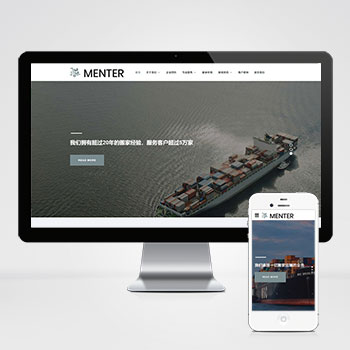 宽屏自适应搬家家政快递物流公司网站模板该宽屏大气的响应式网站模板专为搬家公司、家政服务及物流快递企业设计,基于PbootCMS内核开发,通过自适应布局确保手机、PC等多终端体验一致,助力企业高效构建专业在线服务平台。查看源码
 -
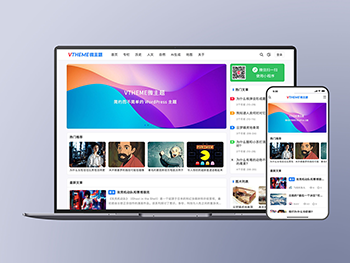 (自适应多语言)WordPress开源主题MirageV资讯个人博客源码MirageV资讯类个人博客主题源码/WordPress主题/全开源MirageV 是一款开源的 WordPress 主题,支持自适应、暗黑模式、多语言等功能,查看源码
 -
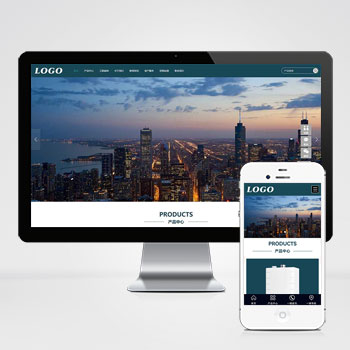 (自适应)大气壁挂炉暖气设备家用电器模板带加盟申请和下载资料为壁挂炉、暖气片等供暖设备企业设计的PbootCMS模板,通过响应式技术实现跨终端展示产品参数和技术细节。后台统一管理确保采暖系统数据、服务网点信息实时同步更新查看源码
| 分享笔记 (共有 篇笔记) |